
Your Standard Operating Procedures Shouldn't Bend to Fit Your Software


Every agency runs differently. Your inventory system should reflect that — not fight it.
If you manage an armory, quartermaster operation, or equipment room, you already have a process. Maybe it's written down in a binder somewhere. Maybe it lives in the heads of the three people who've been doing it for years. Either way, it works — and the last thing you need is software that forces you to abandon it.

That's the problem with most "out of the box" inventory management tools. They're built for everyone, which means they're built for no one in particular. Construction companies, hospitals, retail stores, and law enforcement agencies all get the same generic interface, the same generic workflows, and the same generic limitations.
At Armory System, we take a fundamentally different approach. We don't hand you a login and wish you luck. We work directly with your team to configure a system that mirrors how your agency actually operates — down to the approval gates, the inspection requirements, and the status codes your people already use.
Custom Workflows 🔁
When we say custom workflows, we're not talking about a drag-and-drop toy that lets you move boxes around on a screen. We're talking about a state machine that governs how every asset in your system moves through its lifecycle.
Here's what that looks like in practice:
Asset Lifecycle States 𝄃𝄂𝄀𝄁𝄃𝄂𝄂𝄃
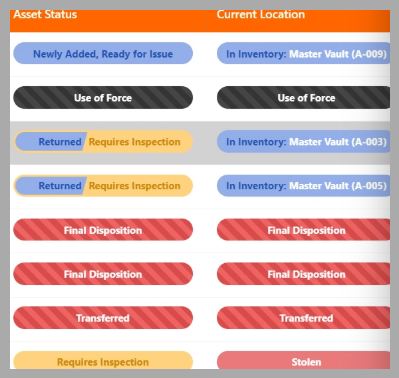
Out of the box, every asset in Armory System carries two parallel statuses:
- Current Location— Where the asset is in physical space right now: With an officer, returned to inventory, lost, or some custom status your agency defines.
- Asset Status — What condition it's in: Needs maintenance, final disposition, or again, your own custom definitions.
These two layers work together to give you a complete picture at a glance. A weapon can be "Returned" (physically back in the armory) but "Needs Maintenance" (not yet cleared for reissue). The system knows the difference, and it enforces the workflow rules accordingly.
Your Statuses, Your Rules
Here's what sets this apart: every status is defined at the organization level. When we onboard a new agency, we sit down with your team and map out the exact statuses that match your SOPs. If your agency uses "Pending Inspection" as a status before a weapon can be reissued, we build that in. If you track "Loaned to Training" separately from "Issued to Officer," we can configure that distinction.
This isn't a one-size-fits-all dropdown. It's your workflow, encoded into the system.
Enforcement, Not Suggestions
The real power isn't in labeling things — it's in enforcing the rules.
When a firearm is returned to your armory, the system doesn't just flip a status and call it done. Here's what actually happens behind the scenes:
1. The asset's operational status is set to "Returned"
2. The inventory status updates automatically
3. The asset is marked as available — but only if it passes the required checks
4. A history entry is created with a full audit trail
All of this happens atomically — meaning it either all succeeds or none of it does. There's no halfway state where an asset shows as "available" in one screen but "issued" in another.
Blocking Reissuance Until Conditions Are Met
This is the feature armorers ask about most: can the system prevent someone from reissuing a weapon that hasn't been inspected?
Yes. And it does it automatically.
If your SOP requires a maintenance record/report, test fire, or inspection before a returned firearm can go back out, the system enforces it. An asset in "Maintenance" status simply cannot be issued. The option isn't available. There's no override button for a clerk to click through — the rule is enforced at the database level.
This is the kind of thing that's impossible in a spreadsheet and impractical in a generic asset tracker. It requires understanding why law enforcement agencies track things the way they do.

How Onboarding Works
When a new agency signs up, here's what happens:
1. Discovery call — We learn about your current process, your pain points, and your SOPs.
2. Configuration — We set up your custom statuses, work lists, notification preferences, roles, and privileges.
3. Data migration — We import your existing asset data from spreadsheets, legacy systems, or wherever it currently lives.
4. Training — We walk your team through the system, configured to match what they already know.
5. Ongoing support — As your SOPs evolve, we adjust the configuration. Need a new status? A new notification trigger? A new role? We make it happen.
This isn't a self-service template. It's a hands-on partnership.
The Bottom Line
Your agency's SOPs exist for a reason. They were built from experience, regulation, and institutional knowledge. The right inventory system doesn't replace that — it enforces it, automates it, and makes sure nothing falls through the cracks.
If you're tired of bending your process to fit your software, we should talk.
Ready to see how Armory System can match your workflow?!
Request a demo or start your free trial
Image by Alexander Gresbek from Pixabay
Image by THAM YUAN YUAN from Pixabay